
Blog · · 5 min read
How do you get realistic AI photos of yourself, with real skin and no plastic look?
Short answer
Start with one sharp, evenly lit selfie with no beauty filter, and use a tool that keeps that selfie as the face reference and asks for an everyday phone-photo look with visible skin texture instead of studio retouching. In Grow, you upload that one selfie, pick a style, and get 5 photos, usually in under 2 minutes (swimwear-heavy styles like Beach, Pool and Yacht can take a bit longer). Your first batch is free and watermarked, with no card needed, so you can check the likeness before you post anything or pay.
No card needed for your first watermarked batch. Only upload a photo of yourself, or one you have the rights to use.
Steps: from one selfie to photos that look like you
Take the right selfie
Face the camera with your eyes open and nothing covering your face (no sunglasses, hands or hair across it). Hold the phone steady so the photo is sharp, and use a recent photo that matches how you look now. One good selfie does more for likeness than any setting you can change later.
Lighting cheat sheet:
- Face a window in daylight for soft, even light.
- Avoid warm overhead bathroom bulbs, which cast orange tones and hard shadows.
- Outdoors, stand in open shade rather than direct midday sun.
- Skip nightclub or party selfies as references: colored light and blur hide your real features.
Turn off beauty filters and smoothing
If the selfie is already smoothed, the AI has no pores, freckles or fine lines to copy, so it fills the gap with generic skin. Use the plain camera, not a beauty mode or a filter app. Natural texture in the input is what makes natural texture possible in the output.
Pick a real-world setting, not a fantasy studio
Glossy studio light and heavy retouching are a big part of why AI portraits look plastic. Everyday places read as more believable: try coffee shop, cozy home or street style first. Grow's style prompts ask for a phone-photo look with natural light, and for real skin texture with visible pores instead of airbrushed or waxy skin.
Generate a batch and compare it with your selfie
Upload your selfie in the Grow app and choose a style. Each batch gives you 5 photos that vary in pose and camera angle, and in most styles also in outfit and time of day. Put each photo next to your selfie and check the details people notice: freckles and moles, eye color, skin tone, hairline and smile. Also check hands and jewelry, which are a common AI weak spot.
Keep the ones that look like you
AI results vary from shot to shot. Post only the frames that pass the side-by-side check and skip the rest. If none of them look like you, check the selfie first: retake it in better light before your next batch. Avoid adding a smoothing filter in your editing app afterwards, because it undoes the texture you just got.
Post honestly
These are AI-generated photos made for your own profile. Meta doesn't require a label on AI images, but it may add one automatically, and Instagram lets you add an AI label when you post. See is it okay to post AI photos on Instagram? For caption help, see Instagram captions and hashtags for photos.
Why AI photos of people look plastic
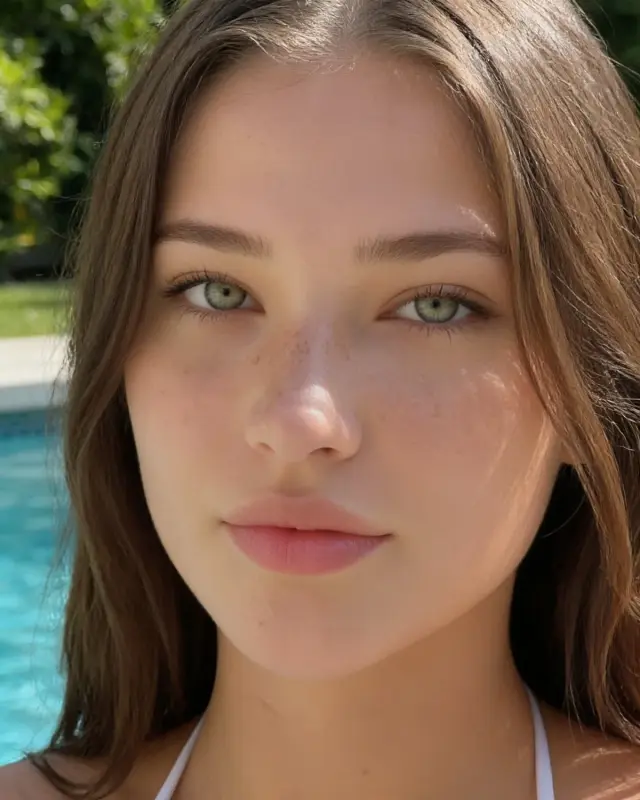 Over-smoothed
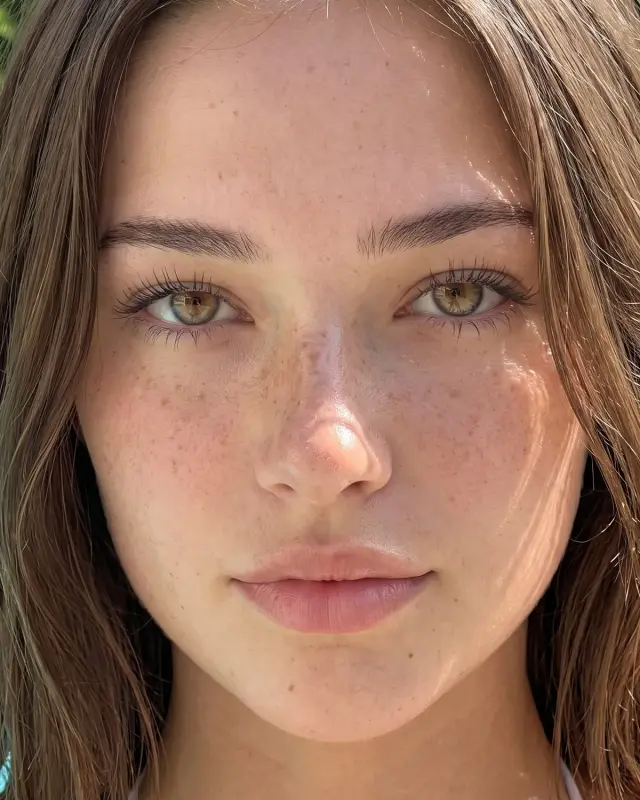 Natural texture
The waxy look usually comes from one of these:
- A filtered or soft selfie. The model cannot keep detail that is not in the photo.
- A low-resolution or blurry input. The model invents a generic face to fill in what it cannot see.
- Studio or glamour styling. Prompts that ask for flawless, magazine-retouched skin get exactly that.
- Extra smoothing afterwards. Beauty filters and some upscalers blur pores and fine lines.
Fix the input first, then choose an everyday style. That covers most cases.
What you get with Grow
- One selfie in, 5 photos out. Grow uses your selfie as the face reference. You do not upload a set of training photos or write prompts.
- Usually ready in under 2 minutes. The 5 photos are generated in parallel and appear as they finish. Swimwear-heavy styles like Beach, Pool and Yacht can take a bit longer.
- A caption with every photo. Each one comes with an Instagram caption and 3 to 5 hashtags that you can edit (Instagram allows up to 5 per post).
- A free first batch. 1 batch of 5 photos with no account and no card. Trial photos carry a "Sign up to claim" watermark and are kept for 24 hours; sign up free to keep them without it.
- Plans if you want more. Starter is $8.99/month for 8 batches (40 photos), Pro is $15.99/month for 25 batches (125 photos), and new subscribers get 50% off the first month. A one-time pack is $9 for 5 batches and never expires. See pricing.
Results are AI-generated and can vary. A clear, well-lit, front-facing selfie gives the best match.
FAQ
Do I need to upload a lot of photos?
No. Grow works from one selfie used as the face reference. Make it sharp, evenly lit, front-facing and unfiltered, because that single photo drives the likeness.
Why doesn't my AI photo look like me?
Most of the time it comes down to the selfie: a beauty filter, low light, blur, sunglasses, or an old photo that no longer matches how you look. Retake it near a window with the plain camera and try again. Results are AI-generated and vary from shot to shot, so keep only the frames that match you.
Is the first batch really free?
Yes. You can make one batch of 5 photos with no account and no card. Free-trial photos carry a "Sign up to claim" watermark and are kept for 24 hours. Sign up for a free account and the same batch is yours without the watermark.
Can I post these photos on Instagram?
They are made for your own profile, and you are responsible for how you use them. Meta doesn't require a label on AI images, but it may add one automatically, and you can add one yourself. Only upload a photo of yourself, or one you have the rights and the person's permission to use.
Is my selfie private?
Your photo and results are stored on Grow's own server and are never shown to other users. To create your images, the photo is sent to the AI image provider used for generation, and for nothing else. Grow does not post anything for you.
How long does Grow keep my photos, and how do I delete them?
Free previews made without an account are deleted automatically after 24 hours unless you sign up to claim them. For accounts, Grow keeps your uploaded photos and results until you ask for them to be deleted or delete your account. To delete, contact Grow's support.
Why are the hands or jewelry wrong in some photos?
Hands, rings and small details are still common AI weak spots. Skip those frames and keep the ones where details look right at full size.
Sources
Checked November 9, 2026. Platform rules change; check the source before relying on it.